⌨️
How much do I type in a day?
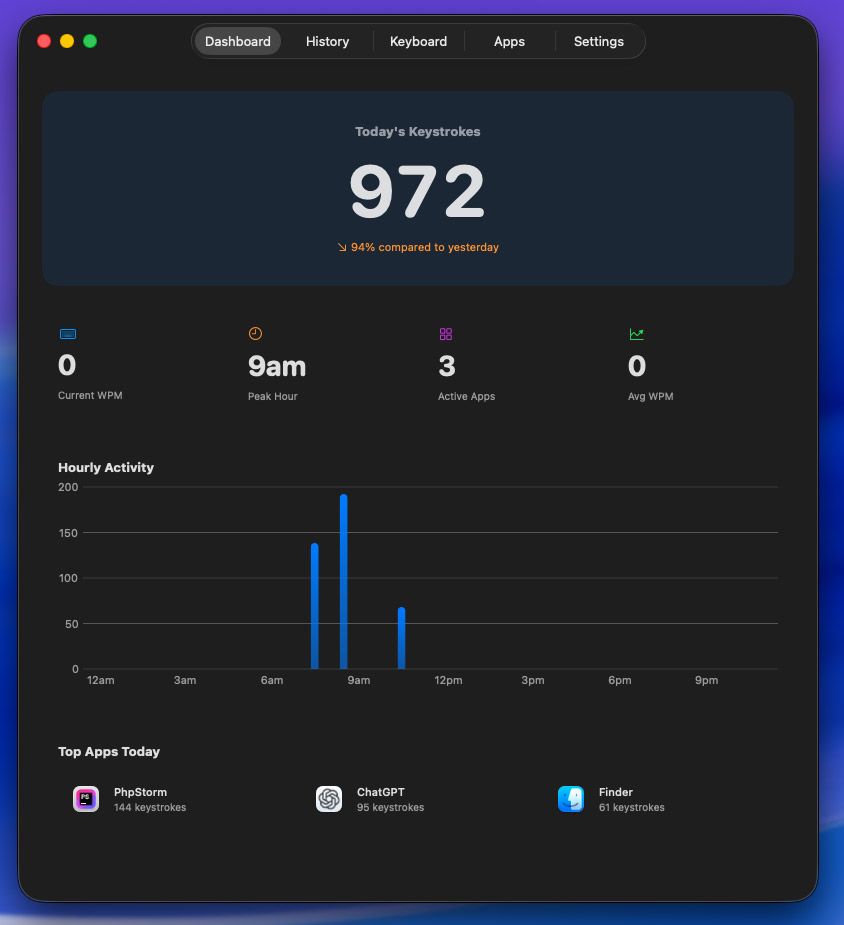
A live counter sits in your menu bar all day, and hourly charts show exactly when your fingers were busiest — morning sprint or midnight grind.
Today · counting in real time
macOS menu bar app
KeyboardCount lives in your menu bar and counts every key you press — then turns it into typing speed, per-app breakdowns, a keyboard heatmap and a GitHub-style activity history. It counts keys, never content, and nothing ever leaves your Mac.
 12,847
Counts key presses only — just like the app.
This demo is live — start typing.
One glance in
A live counter sits in your menu bar all day, and hourly charts show exactly when your fingers were busiest — morning sprint or midnight grind.
A per-app breakdown shows where your typing actually goes — editor, browser, chat. Exclude password managers and other sensitive apps entirely.
No. KeyboardCount stores key counts and timing — never the characters. It makes zero network requests, so your data couldn’t leave your Mac even by accident.
Screenshots
Straight from the app — the dashboard, the menu bar, keyboard stats and per-app analytics. Click any screenshot for full size.
Features
Your running total sits in the menu bar, with quick stats and sparkline charts one click away.
WPM in real time, peak speeds, and the hours of the day you type fastest.
See which apps get your keystrokes — and exclude sensitive ones from tracking entirely.
A visual map of your most-used keys. Find out whether you really do live on backspace.
A GitHub-style contribution grid over weeks and months, plus hourly 24-hour breakdowns.
Export everything to CSV, pause tracking, or delete all stored data with one click.
Private by design
A keystroke counter has to earn trust. KeyboardCount does it with architecture, not promises.
Only key presses and timing are stored — never the characters, words or passwords you type.
No cloud sync, no analytics, no telemetry. The app literally never talks to the internet.
Keep password managers and other sensitive apps out of the data entirely, from Settings.
Pause tracking with one click, and delete everything the app has ever stored just as fast.
Getting started
Pay once with Stripe. Your license key and download link arrive by email right away.
Install the app and enter your license key. macOS asks once for permission to count keystrokes system-wide.
Watch the counter climb in your menu bar. Speed, heatmaps and history build from day one.
Pricing
One-time purchase, no subscription, free updates for life. The license key arrives by email right after checkout.
FAQ
KeyboardCount
Every keystroke counted into speed, heatmaps and history — on your Mac and nowhere else.
One-time purchase · Free lifetime updates · macOS 14+